Project 01 — Agentic AI
View on GitHub ↗
Multi-Agent AI Research Assistant
Agentic AI
LangGraph
LangChain
GPT-4
Tool Use
FastAPI
Python
Docker
The Problem
Research is tedious. You search, read, cross-reference, synthesise, and repeat — and most of it is mechanical work that doesn't need a human brain. I wanted to build a system where multiple AI agents handle different parts of the research process and coordinate with each other, the way a small research team would.
Architecture
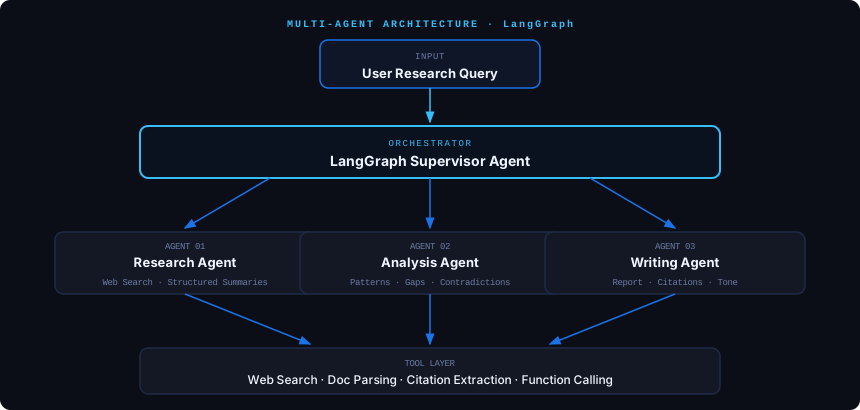
Orchestrator Agent: LangGraph-based supervisor that breaks research queries into sub-tasks, delegates to specialist agents, and synthesises their outputs into a coherent report
Research Agent: Searches the web, extracts key information, and produces structured summaries with source citations
Analysis Agent: Takes research outputs and identifies patterns, contradictions, and knowledge gaps across multiple sources
Writing Agent: Produces the final structured report with proper citations, maintaining consistent tone and logical flow
Tool Layer: Web search, document parsing, citation extraction, and structured output formatting via function calling
Design Decisions
- ▸ LangGraph over raw LangChain because I needed conditional routing — the orchestrator decides which agent to call based on the current state of the research
- ▸ Separate agents with distinct system prompts rather than one monolithic chain — each agent is focused and testable independently
- ▸ Structured outputs via function calling to ensure agents communicate in predictable formats, not free-text
- ▸ FastAPI service wrapping the agent system so it can be called as an API, not just run as a script
What I Learned
The hardest part of multi-agent systems isn't building individual agents — it's designing the communication protocol between them. When agents pass free-text to each other, quality degrades fast. Structured outputs and clear state machines made the system dramatically more reliable. Also: agent orchestration frameworks are still immature, so expect to build custom routing logic.